
ShackDeck: FT8, logbook and SDR receivers in one free program
A free program for Mac, Windows, iPhone and Android: an FT8 decoder, a logbook, hundreds of online receivers, satellites and a station catalogue.

A radio amateur’s desk usually runs not one program but five. One decodes FT8, a second keeps the logbook, a third shows who is on the air right now, a browser tab holds somebody else’s online receiver, and satellites get a program of their own. Switching between them means copying data by hand and keeping every clock in step.
ShackDeck puts all of that into one window: decoders for the digital modes led by FT8, a logbook, hundreds of public SDR receivers around the world, your own transceiver over a cable, satellites, weather fax and a catalogue of stations worth hearing. The program is free, runs on Mac and Windows, and since November it has apps for iPhone and Android. Below is a part-by-part look at what it does, who it suits and where it is still rough.
If you are not a radio amateur. Amateur radio is a hobby with a licence and a personal callsign. People talk by radio directly, with no internet and no operators in between, over hundreds and thousands of kilometres: shortwave bounces off the upper atmosphere, so a transmitter no stronger than a light bulb on a balcony in Kyiv is heard in Japan. What they get out of it: the thrill of the hunt when a rare country, an island or a cosmonaut on the ISS is caught, a collection of confirmed contacts and awards, competitions, and the technology itself, from antennas to digital signal processing.
What FT8 is. A digital mode in which the computer encodes and decodes the signal. One contact takes a minute, and the signal gets through where a voice is lost in the noise. In a few years half of the air moved to FT8, and it is the easiest place to start.
What online receivers are. Thousands of public receivers around the world stream the air over the internet. To hear cosmonauts, a mystery station or pirates on a military satellite you need no antenna of your own, a laptop is enough.
Why one program at all
The classic ham setup builds up over years, and every task in it has a program of its own.
| Task | What is usually used | What it is |
|---|---|---|
| FT8 and FT4 | WSJT-X, JTDX, MSHV | the decoder and the contacts; the log in them is token |
| FT8 decodes on a map | GridTracker | takes the decodes from WSJT-X and draws who is heard and who is not yet in the log |
| Logbook | UR5EQF Log, Log4OM, Ham Radio Deluxe (HRD), Logger32, CQRLOG, AALog | keeping contacts, callsign lookup, uploads to LoTW and eQSL, awards |
| Who is on the air | DX cluster websites, PSKReporter | spots of other stations and a map of who hears your signal |
| The air without an antenna | KiwiSDR, WebSDR, OpenWebRX in the browser | public online receivers around the world |
| Your own SDR receiver | SDR#, SDR++, HDSDR | the waterfall and reception from an RTL-SDR dongle |
| Rig control | Omni-Rig, Hamlib, rigctld | CAT over a cable: frequency and mode between the radio and the computer |
| RTTY, PSK31, SSTV, fax | Fldigi, MMTTY, MMSSTV | the old-school digital modes and weather charts |
| Satellites | Gpredict, Orbitron, SatPC32 | passes, Doppler correction, antenna rotation |
| APRS | APRSISCE/32, Xastir | positions and short messages |
For these programs to see each other, bridges are laid between them: virtual COM ports such as VSPE and com0com, virtual audio cables such as VB-Cable, contacts passed from WSJT-X to the log over UDP. Each program is good at its job, but together they demand setup and attention. For a newcomer who has just received a callsign and wants a first FT8 contact, this zoo kills the interest at the door.
ShackDeck starts from the other end: one installer, one window, one map. The author, Dmytro Hoidenko, a radio amateur from Ukraine, began it as his own logbook and then added whatever he was missing on his own desk.
FT8 and the other digital modes
The heart of the program sits on the receiver tab. A waterfall runs across the bottom, frequency, mode and band sit above it, and under the waterfall come the decode lines: who is calling whom, from which grid square, at what signal level. The decoder is built in, nothing else needs installing.
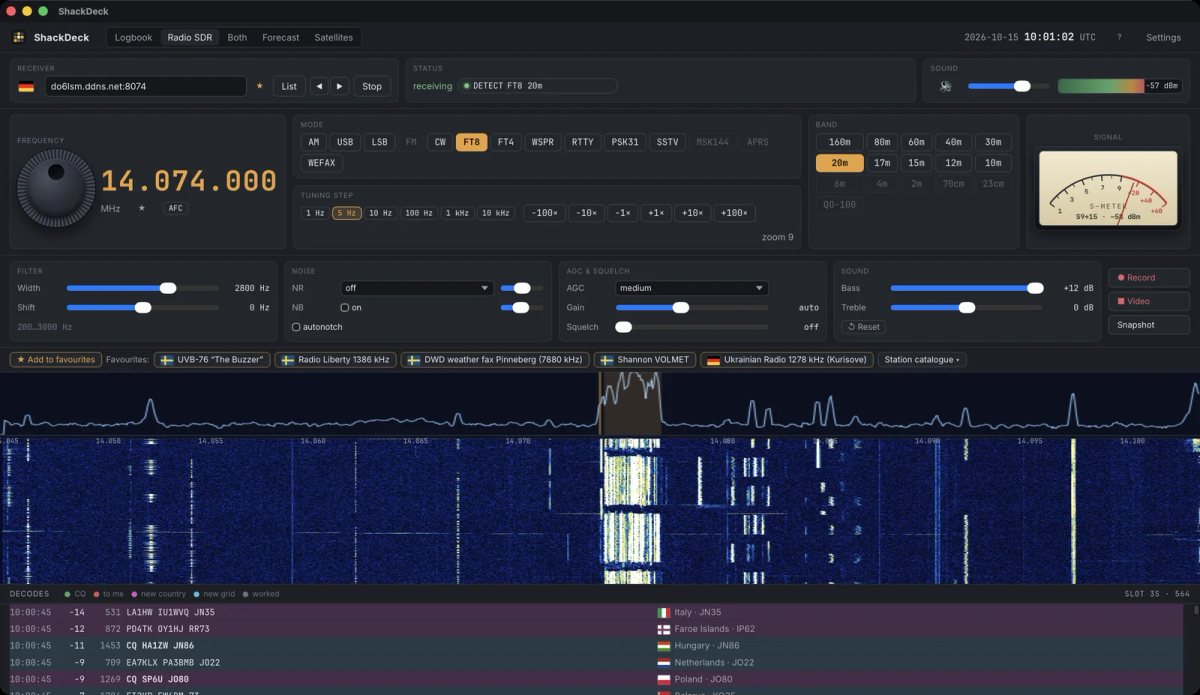
Besides FT8 the program decodes FT4, WSPR, RTTY, PSK31, SSTV, CW and MSK144, plus weather fax and APRS. Every station heard appears on the map at once: country, grid square, bearing. Those not yet in the log are marked in colour, so a new country is visible within a second.
Contacts on FT8, FT4, MSK144, RTTY, PSK31 and SSTV are made from the program itself, by the same rules as WSJT-X: automatic sequencing, a reply to CQ with one click. For that a transceiver is connected to the computer over a CAT cable. Icom, Yaesu, Kenwood, Elecraft, Xiegu and the old radios are supported, and for receiving an RTL-SDR USB dongle will do.
The logbook
The logbook in ShackDeck is not a separate module but an extension of the decoder. A click on a callsign in the decode list fills in the new contact form: band, frequency, mode, report, grid. A contact made from the program lands in the log by itself. So the log never holds a contact that did not happen.
The rest is what a serious logbook is expected to have:
- ADIF import and export, so the log moves in from any other program and back out;
- callsign lookup on QRZ.com and HamQTH: name, town, photo;
- a map of worked countries and grid squares, with counters of entities, zones and grids;
- uploads to LoTW, eQSL, QRZ Logbook and Club Log, where contacts get confirmed by the other side;
- a copy of the log in the ShackDeck cloud, to move it to a second computer or restore it after a reinstall.
Contacts made over the internet rather than by radio are logged with the PROP_MODE=INTERNET mark and are never uploaded anywhere. More on that mode below.
Hundreds of receivers without an antenna of your own
The second pillar of the program is public online receivers. There are thousands of them worldwide, but at any moment half are busy, switched off or deaf on the band you need. ShackDeck checks them live, sorts them by distance from you and shows which bands each one covers. After that it is ordinary receiver work: a tuning knob, a waterfall, a filter, a noise blanker, favourites.
For someone with no antenna this is a full way to listen to the air and decode FT8. For a ham with a radio it is a second ear: to hear how his own signal sounds at the far end of Europe, or to check propagation on a band he does not have.
Your own receiver or transceiver connects on the same tab, under “My device”. Frequency and mode travel both ways: turn the knob on the radio and the program follows, and the other way round.
The station catalogue: 215 stations in 11 rubrics
Here ShackDeck steps outside amateur radio. The program carries a catalogue of stations worth hearing at least once, and each has a dossier behind the question mark: what it is, who transmits, when it is heard best. The listen button picks a public receiver that actually hears that station and tunes it.
| Rubric | Stations | What is inside |
|---|---|---|
| Mystery stations | 24 | UVB-76 “The Buzzer”, The Pip, The Squeaky Wheel, The Goose and other markers |
| Military | 14 | the US Air Force HFGCS net on 11175 kHz, SATCOM military satellites and the pirates on them |
| Aviation | 13 | Shannon, New York and RAF VOLMET, oceanic frequencies |
| Time signals | 11 | RWM, WWV and other standards |
| Beacons | 10 | the beacons used to check propagation |
| Fax and digital signals | 18 | DWD weather charts, DHO38 on 23.4 kHz |
| ISS | 6 | crew talking to mission control on 143.625 MHz, SSTV pictures on 145.800, the repeater on 437.800 |
| QO-100 | 8 | the geostationary amateur transponder |
| Shortwave broadcast | 49 | broadcasters from around the world |
| Medium and long wave | 26 | including Radio Liberty on 1386 kHz |
| Amateur radio | 36 | FT8 on 14074, SSB segments, popular frequencies |
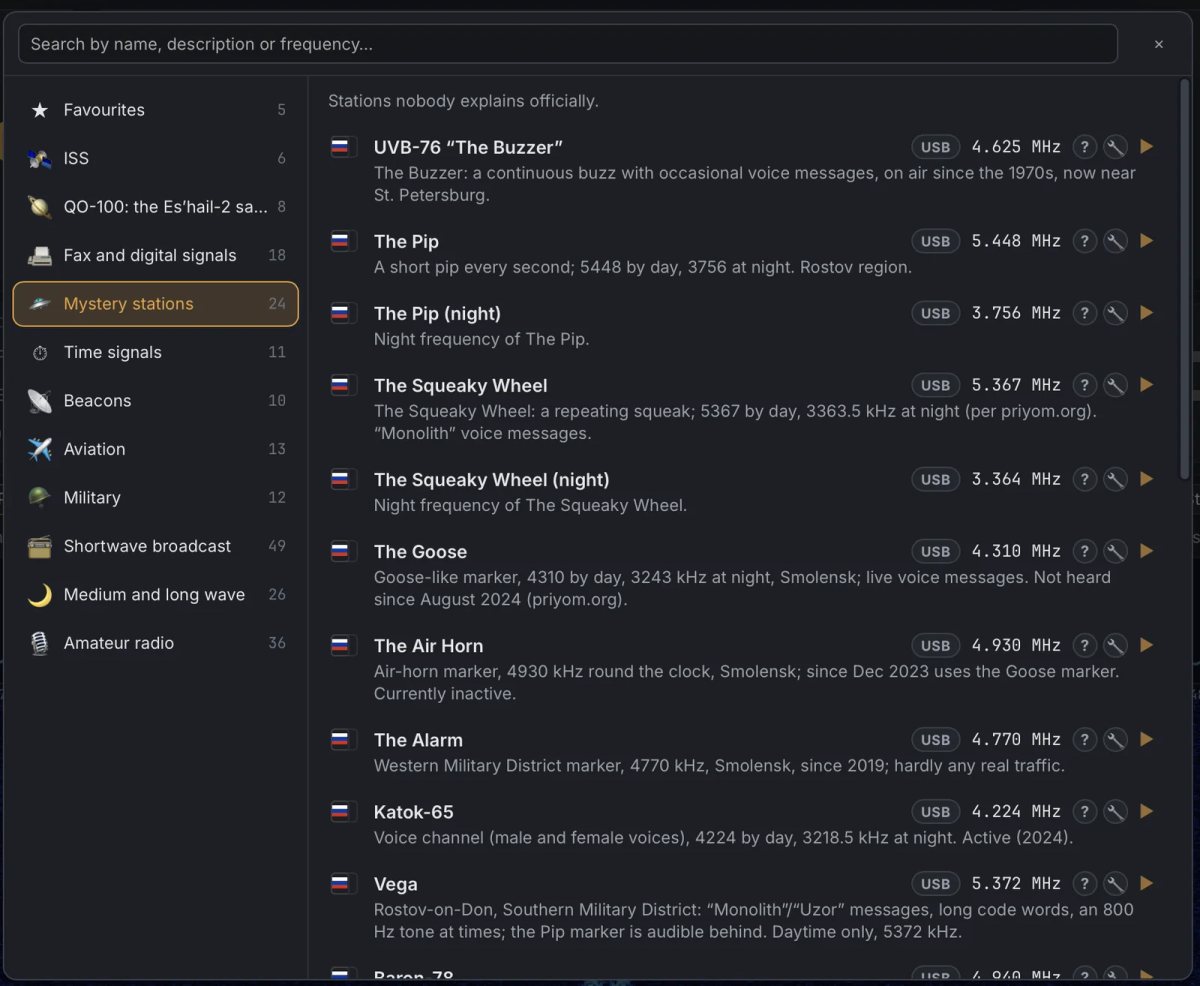
This is the part that hooks people far from callsigns. Hearing the ISS crew report to mission control, catching pirates chatting through an American military satellite on 261.618 MHz, or listening to The Buzzer, which has been droning on 4625 kHz for forty years, takes five minutes after installation.
Satellites, the ISS and Starlink
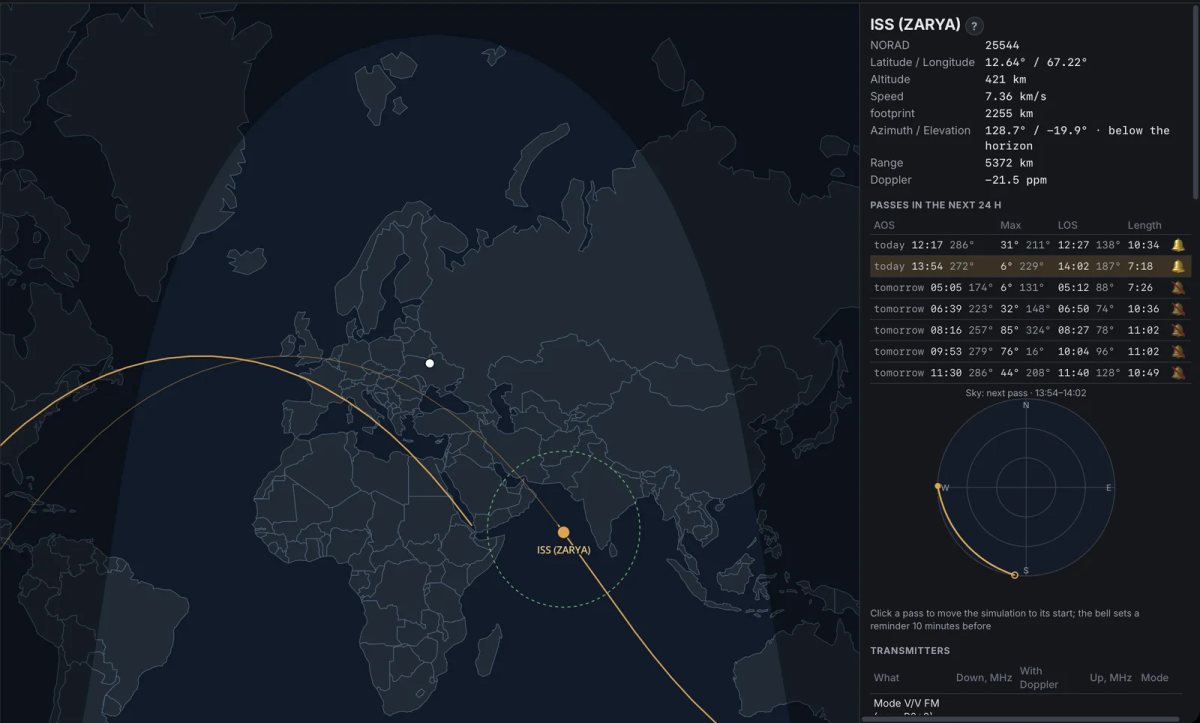
The satellites tab shows where the ISS, amateur and weather satellites are right now and works out the passes for the next day: azimuth, elevation, frequencies corrected for Doppler. Every pass has a reminder and a listen link that opens a public receiver under the satellite.
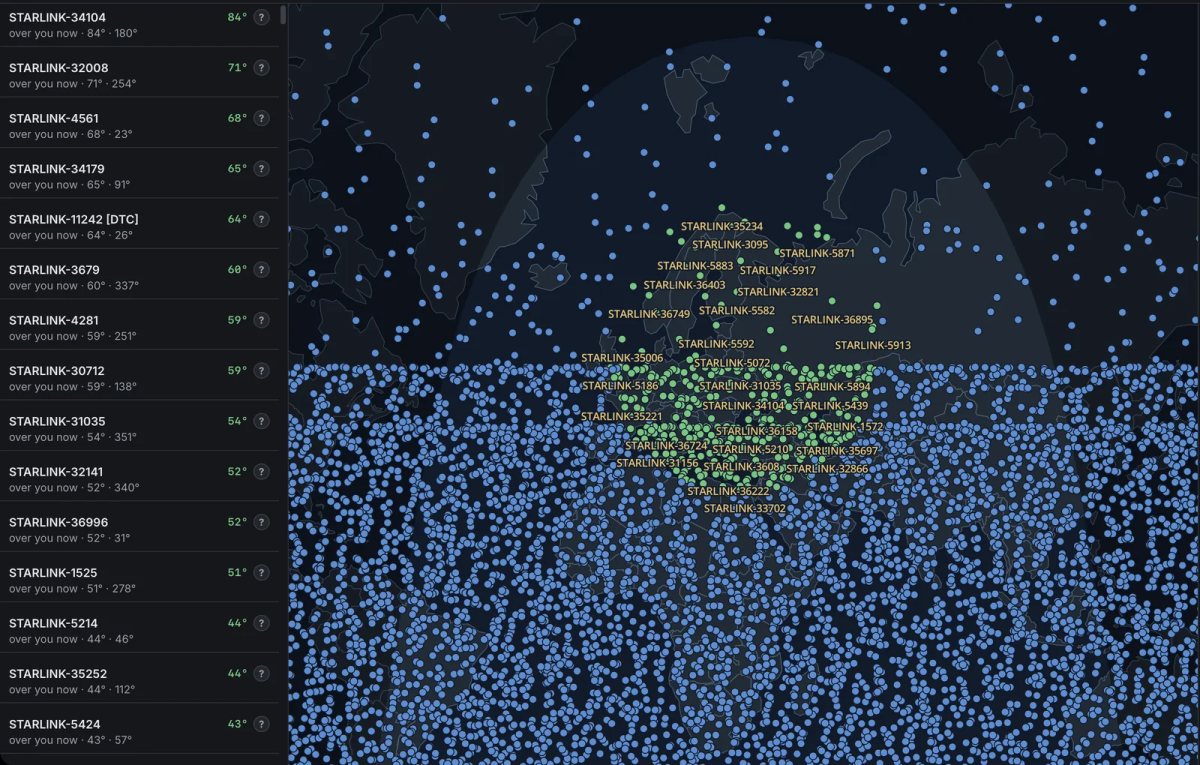
Starlink sits in a group of its own, otherwise its ten thousand satellites would blanket the map. The group switches on when asked, and then the whole constellation appears, with the satellites overhead named.
QO-100 is a story of its own: a geostationary amateur transponder at 10.49 GHz through which Europe, the Middle East, Africa and India talk to each other. It needs a dish, but the catalogue holds public receivers that already have one. The frequency arithmetic is done by the program.
Fax, APRS and weather charts
The German weather service DWD transmits weather charts on 7880 kHz around the clock the old way, as fax. ShackDeck takes them straight from the air: it finds the start of the line, measures the line period so the chart does not lean, and ends the picture on the stop tone. Ten minutes later a finished pressure chart is on screen. APRS, the short-message and position service used by hams, is decoded in the same place.
The online band: contacts over the internet
The most unusual feature. ShackDeck users hear each other through the program’s website, with real modulation: FT8, FT4, MSK144, RTTY, PSK31 and SSTV go as they do on the air, with noise, fading and distance. The band behaves like a real one: 160 metres opens only at night, the high bands now and then, meteor pings fly by on VHF.
Contacts follow the WSJT-X rules and go into the log marked as internet. Nothing reaches the radio air. For a newcomer it is a trainer: rehearse the FT8 sequence before going on the air for real. For an experienced operator it is a way to check equipment and decoders without an antenna.
The DX cluster and listeners’ recordings
The cluster in ShackDeck is its own and live: it holds only what users’ programs decoded just now, no hand-typed spots. It shows the callsign, where it was heard, the band, the mode and the level. The same stream is open to everyone on the program’s website.
The “Publish the signal” button records up to five minutes of air with a snapshot of the waterfall and publishes it on the site under the listener’s callsign. Next to it is “What is this signal?” for anyone who heard something strange. That is how recordings of pirates on SATCOM and on 40 metres, VOLMET and time signals ended up on the site.
Data deserves a separate word. The program sends the site only decode summaries: callsign, band, mode, receiver, the hour. Audio and message texts are never sent. From those summaries every callsign heard gets a page on the site: who hears it, on which bands and at what hours.
The phone: iPhone and Android
Since November 4, 2026 ShackDeck is on the App Store, and the Android app is downloaded from the program’s website. The phone works in two roles.
On its own it listens: online receivers, its own FT8 decoder, the waterfall and the map with stations. There is no log and no transmitting on the phone, because there is neither a radio nor a logbook in it.
Paired with the program on a computer, the phone becomes a remote for everything: the tuning knob, the mode, the band, decodes with flags, the map with the colours of wanted stations, the waterfall, and making contacts by FT8 and by voice through the radio that stays at home. At home the link runs over the local network, on the road through the site. Pairing takes a minute: the program opens its Remote tab with a QR code, and the phone scans it.
Platforms, price and what is paid
| macOS | 12 or newer, Apple Silicon; the build is signed and notarized by Apple |
| Windows | 10 and 11, with an ARM64 build |
| iPhone and iPad | iOS 17 or newer, App Store |
| Android | APK from the program’s website |
| Current version | 0.4.8 of October 23, 2026 |
| Updates | automatic, inside the program |
| Price | free |
The paid part is a single one: the Plus subscription, which adds scheduled automatic copies of the log to the cloud and a direct line to the developer. Everything described above, including the decoders, the logbook, the receivers, the catalogue, the satellites and uploads to LoTW, works without it. No store accounts are needed, and there is no registration on the site.
Who it suits and what to keep in mind
The program is useful to anyone who has just received a callsign and wants a first FT8 contact without a week of setup. To anyone with no antenna but an interest in the air: the station catalogue and the online receivers cover that completely. And to anyone tired of five windows on the desk.
There is another side. ShackDeck is a young program: versions come out almost every week, each with a list of fixes. That means fast growth, but also rough edges: in October, for instance, an interface freeze was being fixed. If you have a settled setup of WSJT-X and a familiar logbook with ten years of history, there is no reason to move for the sake of moving, although the move takes ten minutes through ADIF. A second window next to it, for the station catalogue, the receivers and the satellites, pays off straight away.
The program and the station catalogue are at shackdeck.com.